



Why no free trial — what if it isn’t a fit?
Install MessyTake, drop in your real takes, and export full Reels. If it doesn’t save you hours within 30 days, reply to your receipt email for a full $67 refund.
MessyTake is a talking-head finishing desk for Mac. Drop in one messy recording. It strips restarts, pauses, and ums — you read what is left, pick a look, and export.
30-day full refund · Apple Silicon Mac (M1+) · Windows waitlist →
One real recording, start to finish, with sound on.
Toggle Raw vs. Finished to hear every cut.



No cloud upload, no AI credits — processed on your Mac with Wi-Fi turned off.
Imagine writing an email where one typo meant ripping out the page and starting over. That is what a 1924 film timeline does to spoken video: scrubbing across your own stumbles triggers voice confrontation until your camera roll fills with dead drafts.
Bare rough-cut apps hand you an unstyled clip. Cloud suites rent back your own Mac for $180–$420 a year and push your raw takes onto remote servers. Stop editing spoken video. Proofread it.
Built for multi-track cinema or monthly cloud rent
Talking-head finishing desk for Mac
Most people think their reels flop because of the algorithm. It’s not, um, wait,
It’s not the algorithm. You’re asking people to
care before you’ve given them a reason to.
Strike a word and the video drops it. Double-click any struck line to restore it. Playback skips cuts live, and your raw file stays untouched.

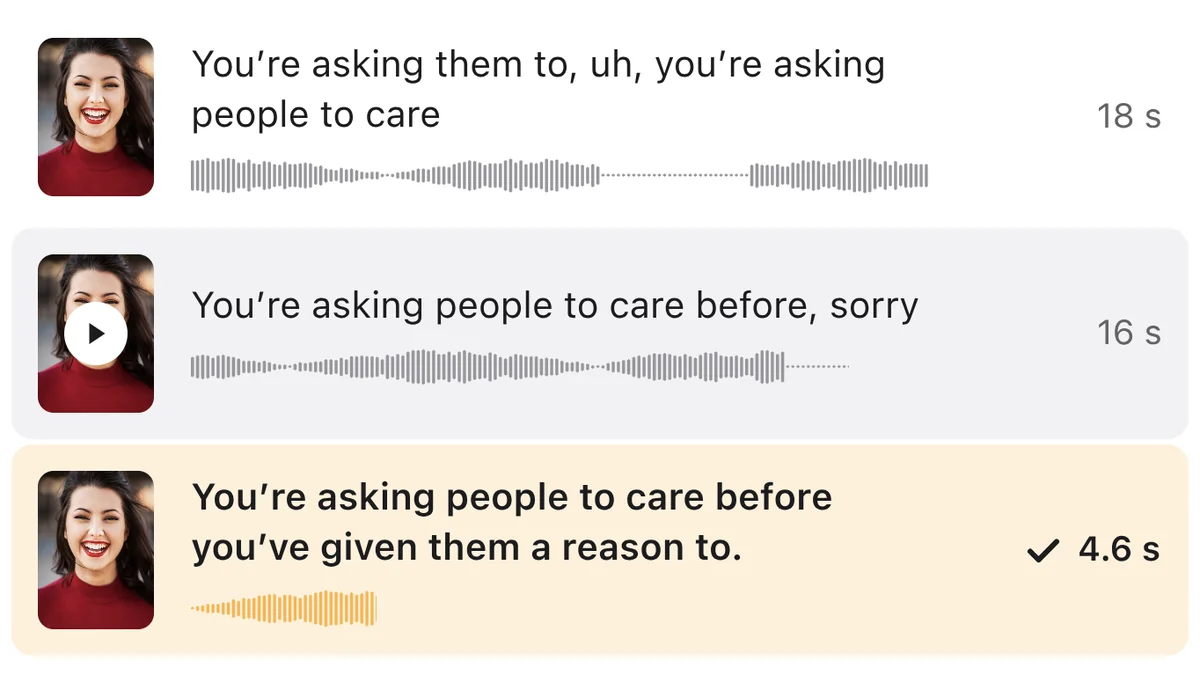
1940s radio hosts never stopped tape on a flub. They paused a beat, said the line again, and kept rolling. MessyTake flags repeated lines, drops the false starts, and keeps your last clean take. Want an old take back? Double-click it.
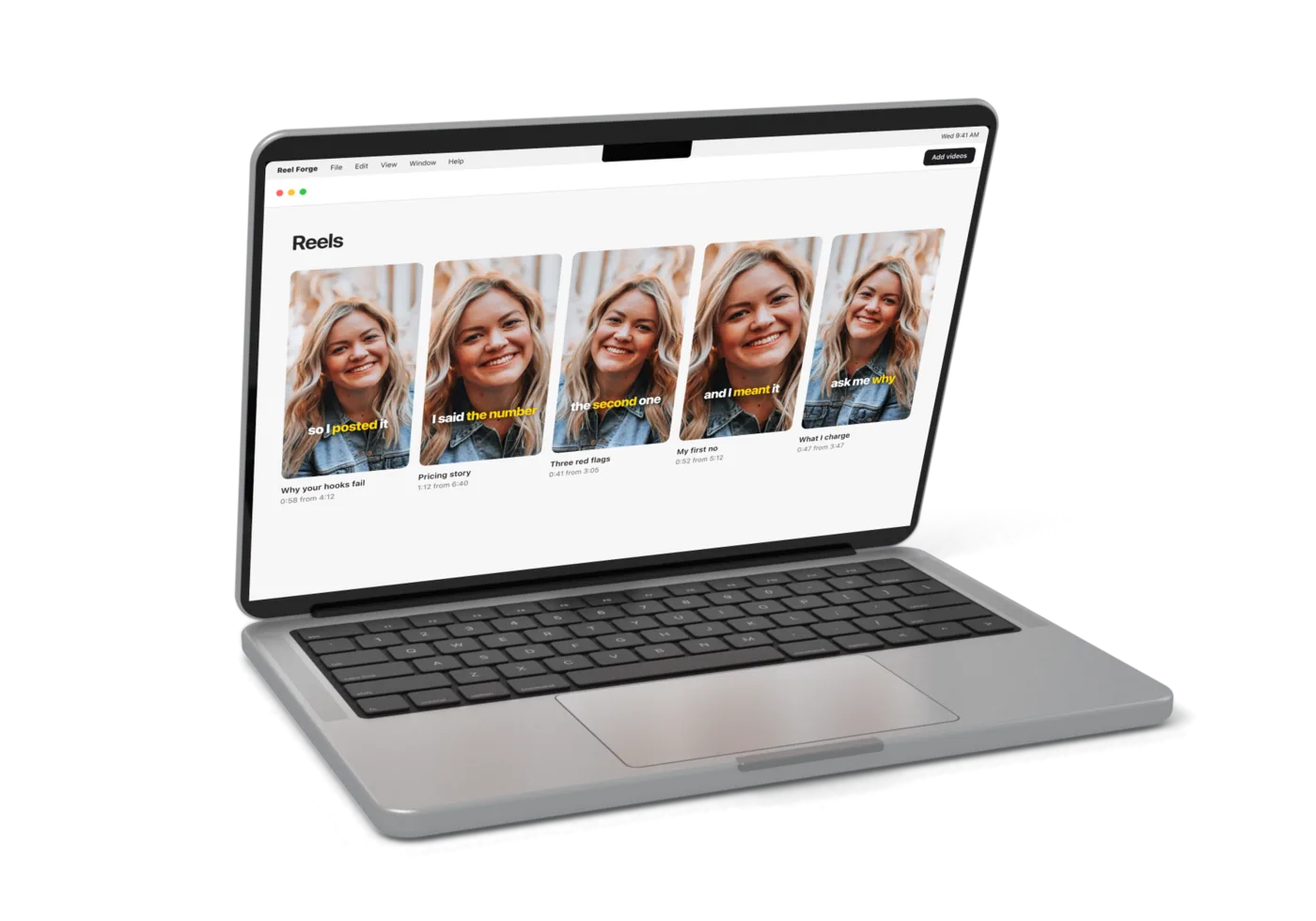
Rough-cut apps hand you a bare clip and send you somewhere else. MessyTake finishes the vertical Reel in one window — readable type, no neon gimmicks.


Talk straight to your phone. Stumble and keep rolling.
Restarts, pauses, and ums are already out. Strike extra lines and pick a look.
Export -16 LUFS MP4 or a versioned CapCut draft.
Transcription, cuts, and export all run on your Apple Silicon Mac. No cloud servers, no account, and no AI training on your outtakes. Turn off Wi-Fi and it works the same.
Apple-notarized Mac app: Signed and notarized by Apple. Opens cleanly with no Full Disk Access, Screen Recording, or Accessibility prompts.
Optional local MCP: No AI subscription needed. If you already use Claude or another AI chat, a local MCP server is built in.
Founding launch price (regular $97) Yours to keep. Make one Reel or a thousand, or take two busy client months off with no bill waiting.
Less than five months of a standard editing subscription — or a single freelance edit.
Apple Silicon Mac (M1+) · Checkout via Stripe · Instant download + offline key · 30-day no-questions refund.
Drop in real takes and export Reels. Not a fit? Reply to your receipt within 30 days for a full refund.
Keep v1 permanently, with every v1.x update and macOS fix free. Any future v2 is optional.
Unlocks up to two Apple Silicon Macs with an offline key. No login and no server check-in.
Clean 1080×1920 -16 LUFS MP4s and versioned CapCut drafts. Your Reel, nothing stamped on it.
Install MessyTake, drop in your real takes, and export full Reels. If it doesn’t save you hours within 30 days, reply to your receipt email for a full $67 refund.
No. v1 focuses on finishing talking-head clips cleanly. Add native audio in Instagram, or export a layered CapCut desktop draft whenever you need music or B-roll.
Nothing is permanently deleted. Every cut word stays struck through in the transcript — double-click any line to restore it, or toggle retakes, pauses, and ums individually.
MessyTake runs local speech recognition right on Apple Silicon. Click any misspelled name or term in the transcript to fix the caption in seconds without moving the cut.
No. No AI account, API key, or monthly token bill is required — everything runs offline on your Mac. If you already use an AI chat app, a local MCP server is built in.
Yes. Every build is signed with an Apple Developer ID and notarized by Apple, so macOS opens it cleanly. It skips the App Store only so it can run local binaries and export desktop drafts.
Never. Your offline key unlocks v1 permanently plus every v1.x update. MessyTake never phones home to stay unlocked, and any future v2 will be an optional upgrade.
Requires an Apple Silicon Mac (M1–M4) running macOS 14 Sonoma or later. Intel Macs, Windows, and phones are not supported in v1 — join the Windows waitlist above for updates.
